> ## Documentation Index
> Fetch the complete documentation index at: https://docs.micleo.com/llms.txt
> Use this file to discover all available pages before exploring further.
# Pinia Store
> Files in the store folder are each linked to an object/table in the database.
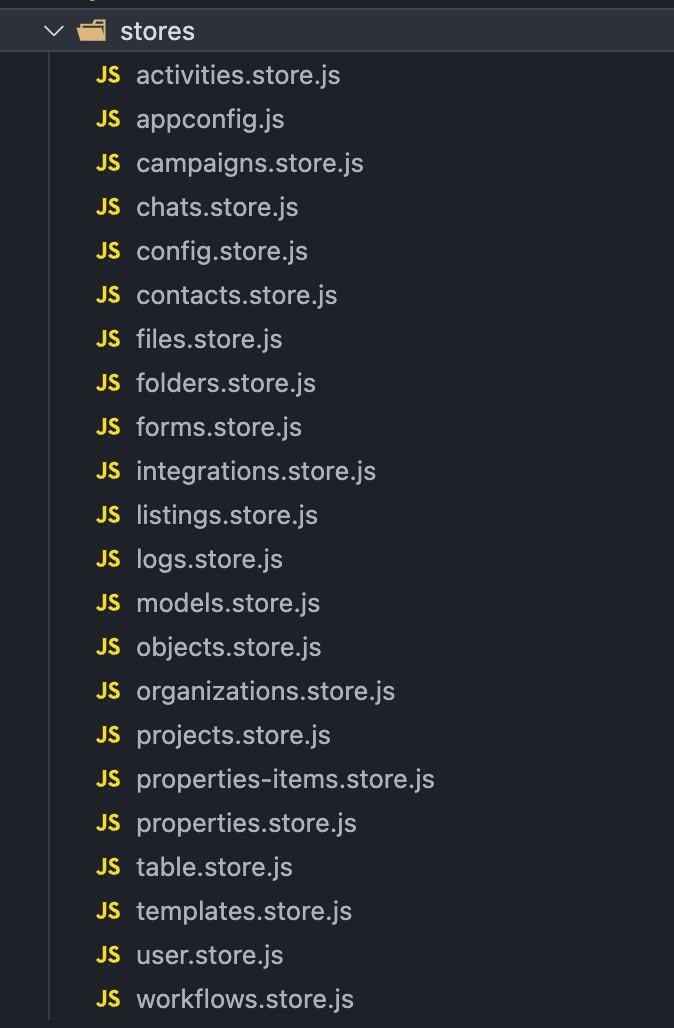 ### Config Store
* Layout settings app store.
### User Store
* Get user details from database
* Login, Register, Reset password, Sign out, Multi-factor authentication
### Projects Store
* Get all projects, create and delete projects
### Organizations Store
* Get all organizations
* Prices, Invoices, Members, Subscriptions, Roles & permissions
### Table Store
This store is linked to all objects of the database. Dynamic Vuetify table with crud operations.
* `TableContent.vue`: The table with dynamic types and filters
* `TableGrid.vue`: The grid view with cards for each elements
* `TableExport.vue`: Select and export specific data from a table
* `TableImport.vue`: Import data from a CSV or Copy Paste it
* `TableForm.vue`: Dynamic form build from a JSON settings
* `TableHeader.vue`: The breadcrumb, path explorer
* `TableFolders.vue`: Filter the rows by a specific folder. Tree explorer, folders, subfolders
### Sub Stores
* Contacts / Objects
* Properties
* Folders
* Models
* Listings
* Templates
* Campaigns
* Activities
* Logs
* Tasks
* Workflows
* Forms
* Files
### Config Store
* Layout settings app store.
### User Store
* Get user details from database
* Login, Register, Reset password, Sign out, Multi-factor authentication
### Projects Store
* Get all projects, create and delete projects
### Organizations Store
* Get all organizations
* Prices, Invoices, Members, Subscriptions, Roles & permissions
### Table Store
This store is linked to all objects of the database. Dynamic Vuetify table with crud operations.
* `TableContent.vue`: The table with dynamic types and filters
* `TableGrid.vue`: The grid view with cards for each elements
* `TableExport.vue`: Select and export specific data from a table
* `TableImport.vue`: Import data from a CSV or Copy Paste it
* `TableForm.vue`: Dynamic form build from a JSON settings
* `TableHeader.vue`: The breadcrumb, path explorer
* `TableFolders.vue`: Filter the rows by a specific folder. Tree explorer, folders, subfolders
### Sub Stores
* Contacts / Objects
* Properties
* Folders
* Models
* Listings
* Templates
* Campaigns
* Activities
* Logs
* Tasks
* Workflows
* Forms
* Files